 Building Cahute for Linux distributions
Warning
In order to install Cahute on Linux, it is recommended to use one of the methods described in Installing Cahute on Linux distributions. However, if Cahute is not available for your distribution, or if you wish to build it manually, this guide is for you.
The following building methods are available.
Note
Since you will not be using a packaged version of Cahute, the project won’t be automatically updated when updating the rest of the system, which means you will need to do it manually, especially if a security update is made.
You can subscribe to releases by creating a Gitlab.com account, and following the steps in Get notified when a release is created. You can check your notification settings at any time in Notifications.
Building Cahute natively for Linux
This guide will assume you have a POSIX or compatible shell, such as
bash or zsh.
Downloading the Cahute source
In order to get the current released version of the Cahute source, you have the following options:
You can download the latest source package:
curl -o cahute-0.6.tar.gz https://ftp.cahuteproject.org/releases/cahute-0.6.tar.gz
tar xvf cahute-0.6.tar.gz
You can clone the repository and checkout the tag corresponding to the release:
git clone https://gitlab.com/cahute/cahute.git cahute-0.6
(cd cahute-0.6 && git checkout -f 0.6)
The project is present in the “cahute-0.6” directory.
Warning
If you are building the project in the context of the Creating a merge request guide, these commands need to be replaced by the following:
git clone <your-repo-url>
Where the repository’s URL can be obtained through the Code button
on the Gitlab.com interface:
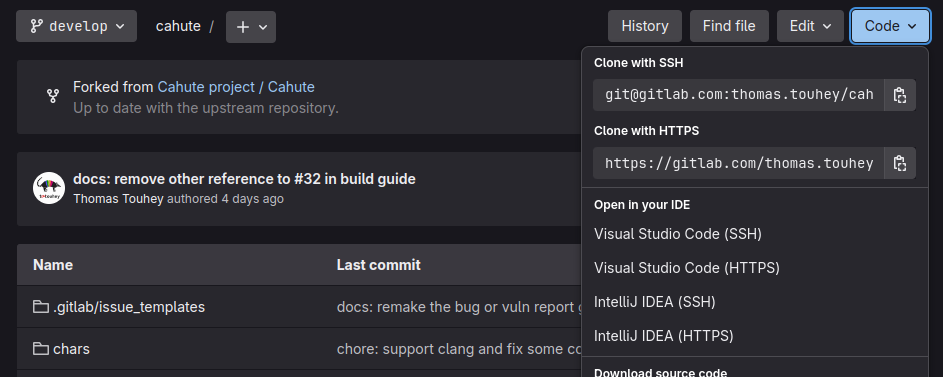
Gitlab.com’s repository interface with “Code” selected, presenting the options to clone the repository.
Installing the dependencies
Cahute depends on the following build-only dependencies:
cmake >= 3.21;
Python >= 3.8;
toml module for Python, either installed through pip or as a native package such as
python-tomlorpython3-toml;GNU Make, pkg-config, and other C compilation and linking utilities.
It also depends on the following build and runtime dependencies:
In order to install the dependencies, it is recommended you use your native package manager. A few examples are the following:
On Debian and derivatives:
sudo apt-get update
sudo apt-get install cmake python3 python3-toml libusb-1.0-0-dev libsdl2-dev
On Archlinux and derivatives:
sudo pacman -Sy cmake python python-toml libusb sdl2
On Voidlinux and derivatives:
xbps-install cmake python3 python3-toml libusb-devel sdl2-devel
Finding out the device group
Warning
This section assumes you have udev, which is provided along with systemd. If your distribution does not use systemd, such as Artix Linux or Devuan, you must skip this section.
Note
If you do not wish to make USB and serial devices accessible to your user, you can skip this section.
On Linux distributions, serial devices such as /dev/ttyUSB* are usually
assigned a group by udev. Said group varies depending on your distribution,
even though it usually is either dialout or uucp.
You can usually find out which group to use by checking the owner of any
/dev/ttyS* device, by running the following command:
ls -l /dev/ttyS*
On Arch Linux, the output of this command resembles the following:
crw-rw---- 1 root uucp 4, 64 20 janv. 15:49 /dev/ttyS0
crw-rw---- 1 root uucp 4, 65 20 janv. 15:49 /dev/ttyS1
...
Which means that, in this case, the name of the device group is uucp.
If this method fails, you need to check what your distribution uses. Check the documentation and/or community of your distribution for something along “System groups” or “tty”.
Building the project
In the parent directory to the source, you can now create the build
directory aside it, and install from it, by running the following commands:
cmake -B build -S cahute-0.6 -DCMAKE_INSTALL_PREFIX=/usr -DCMAKE_BUILD_TYPE=Release -DCAHUTE_UDEV_GROUP=<your_device_group>
cmake --build build
Warning
If you have skipped Finding out the device group, replace
-DCAHUTE_UDEV_GROUP=... with -DCAHUTE_UDEV=OFF.
Note
While CMake uses -O3 by default for the Release configuration,
this is considered an undesired behaviour by Cahute, hence Cahute overrides
it with -O2 by default.
See CMAKE_BUILD_TYPE for more information.
Installing the project
If you want to install Cahute from the built version on your system directly, you can use the following command while in the build directory:
sudo cmake --install build --strip
If, however, you want to install the result into a given directory, you can use the following command:
DESTDIR=./dist cmake --install build --strip
Loading the new udev rules
Warning
If you have skipped Finding out the device group, you must skip this section.
In order to load the new udev rules, you must either run the following command, or reboot your system:
sudo udevadm control --reload
Providing access to USB and serial devices to your user
Warning
If you have skipped Finding out the device group, you must skip this section.
In order to obtain access to both USB and serial devices as your current user, you must add the device group as a supplementary group to your user, by running the following command:
sudo usermod -a -G <your_device_group> <your_username>
For example, if your device group is dialout and your username is
john.cahute, the command will be the following:
sudo usermod -a -G dialout john.cahute
Note
If you don’t know your current username, you can find it out by running the following command:
id -nu
You must then either log off completely then log in again, or reboot your computer, for the new supplementary group to take effect.
Warning
If you’re using a desktop environment, locking the screen or putting your computer in standby mode is NOT equivalent to logging off. If in doubt, rebooting is a straightforward option in comparison.